
Editor’s Brief
This is the most practically grounded entry in the “AI agent trainer guide” series to date. Where earlier guides focused on initial setup and prompt hygiene, this one tackles the structural question that separates hobbyist AI use from genuine productivity: how do you organise the workspace around your agent so that complexity scales without collapsing? Zhixian’s answer is to stop relying on a single scrolling chat window and instead map your AI sessions onto Discord’s three-tier Server-Channel-Thread architecture. The resulting “Doomsday Cabin” setup is not a gimmick — it is a fully operational digital headquarters that handles brainstorming, project execution, automated feeds, and multi-agent routing in parallel. If you are serious about turning AI agent trainer guide Discord automation from a concept into a daily workflow, this is the blueprint. Read the channel-selection reasoning first; it will frame every configuration decision that follows.
Key Takeaways
- Discord beats WhatsApp and Telegram for complex AI workflows. WhatsApp’s unofficial login method causes instability. Telegram excels at quick, mobile-first exchanges. Discord’s Server-Channel-Thread hierarchy is the only structure capable of managing parallel, long-running AI projects without session chaos.
- Main Session ownership determines memory access and privacy scope. Only DM-type sessions (Telegram, Discord Bot DM, iMessage) are treated as the owner’s Main Session, which loads the private MEMORY.md file by default. Understanding this prevents accidental memory leakage when you share the bot with others.
- session.dmScope and session.identityLinks together solve the multi-user isolation problem. The first isolates different users from each other; the second links your own DMs across platforms back into a single unified session — giving you external separation without sacrificing personal continuity.
- Discord Threads eliminate session explosion in group contexts. Instructing the agent to always reply inside a Thread keeps the main channel as a clean high-level log while detailed conversations unfold in nested sub-spaces. The 2026.2.1 update adds automatic thread-to-parent-channel context inheritance, solving the cold-start problem for new threads.
- The “Doomsday Cabin” channel taxonomy is a replicable productivity system. Daily (brainstorming), project channels (Writing, Dev), and automated feeds (Digest, Heartbeat) map directly to the three modes of knowledge work: exploration, execution, and monitoring.
- Discord Reactions are natural-language-programmable triggers. Assigning emoji reactions to specific agent actions — such as saving a message to a reading list with a heart reaction — is functionally equivalent to writing a conditional statement, but requires zero code.
- Model routing by channel is the Discord-native equivalent of cost optimisation. Assigning Claude Opus to high-complexity product channels and Sonnet to development channels applies the same principle as the “main force vs. lightweight clone” approach, but enforced by workspace architecture rather than manual selection.
Editor’s Brief
A technical deep dive into optimizing OpenClaw (formerly Moltbot) by leveraging Discord’s hierarchical structure. The guide moves beyond simple chatbot interactions, detailing how to use Discord’s servers, channels, and threads to manage complex AI sessions, isolate user identities, and implement natural language automation for project management.
Key Takeaways
- Channel Selection:** WhatsApp is discouraged due to stability issues and "hacky" login methods. Telegram is ideal for quick, mobile-first interactions, while Discord is the superior choice for structured, multi-threaded workflows.
- Session Management:** OpenClaw uses a "Main Session" for the owner, granting access to private memory files. Users can use `session.dmScope` and `session.identityLinks` to isolate different users while keeping their own cross-platform chats synchronized.
- Discord Threads as Workspace:** Threads allow for sub-discussions without cluttering main channels. A key update enables threads to inherit parent channel context, preventing the "session explosion" common in group chats.
- The "Doomsday Hut" Workflow:** A practical organizational model using specific channels for brainstorming (Daily), project execution (Writing/Dev), and automated feeds (Digest/Heartbeat).
- Advanced Automation:** Using Discord reactions (emojis) as functional triggers and assigning specific AI models (e.g., Claude 3.5 Sonnet vs. Opus) to different channels based on task complexity.
- Natural Language Programming:** The shift from writing code to "compiling" workflows via natural language instructions, where the agent acts as the bridge between intent and execution.
Editorial Comment
The transition from treating AI as a novelty chatbot to treating it as a functional member of a production team is currently the biggest hurdle in the "Agentic" era. Zhixian’s guide to OpenClaw via Discord isn't just a tutorial on settings; it is a blueprint for building a digital headquarters. Most users struggle with AI because the interface—usually a single, scrolling text box—collapses under the weight of complex projects. When you try to plan a product launch, debug code, and summarize news in one window, the context window gets "noisy," and the AI loses the thread.
The brilliance of using Discord lies in its existing hierarchy. By mapping OpenClaw sessions to Discord’s Server-Channel-Thread architecture, you effectively give the AI a filing cabinet. The author’s "Doomsday Hut" setup is a masterclass in reducing mental overhead. By forcing the agent to reply within threads, the main channel stays clean, acting as a high-level log of activity, while the "heavy lifting" happens in nested conversations. This mirrors how high-performing human teams actually work—they don't shout everything in one room; they break off into breakout sessions.
One of the most practical takeaways here is the handling of the "Main Session." In the early days of personal AI, privacy was an all-or-nothing affair. If you shared your bot with a friend, they might accidentally trigger your personal memories. The technical configuration mentioned—`session.dmScope`—is a vital piece of "AI hygiene." It allows a single agent to be a multi-tenant system: a private assistant to you, and a restricted tool for your family or colleagues, all while maintaining a unified identity for the owner across Telegram and Discord.
We are also seeing a shift in how we think about "programming." For years, we’ve been told that everyone needs to learn Python to automate their lives. Zhixian argues that we are entering an era of natural language compilation. When you tell an agent, "Every time I react with a heart emoji, save this to my reading list," you are essentially writing a conditional statement. You aren't writing the logic in JavaScript; you are describing the desired state to an agent that understands the Discord API. This lowers the barrier to entry for complex automation significantly.
However, the guide also offers a reality check on the "all-in-one" dream. The author’s decision to keep Telegram for "short and fast" interactions while using Discord for "deep work" is a mature take on tool selection. It acknowledges that our digital lives are fragmented by context. You don't want to manage a multi-threaded project on a 6-inch phone screen while standing in line for coffee; you want a quick answer. Conversely, you don't want to run a business through a series of disjointed DMs.
For anyone looking to move beyond the "prompt-and-response" loop, this guide is a necessary look at the infrastructure of intelligence. It’s not about how smart the model is; it’s about how you organize the space in which that model operates. If your workspace is a mess, even a genius assistant will struggle to find the right file. Discord, when configured this way, turns the mess into a system.
Introduction
The following content is compiled by NOVSITA based on public sources and is for reading and research reference only.
focus
- The second tutorial promised is here. Unexpectedly, there was no update in just a few days, and Moltbot changed its name again. I can only say that the pace of the AI era is really fast. Faster than changing your name…
- OpenClaw currently supports mainstream channels including WhatsApp, Telegram, Discord, iMessage, Sl…
Remark
For parts involving rules, benefits or judgments, please refer to the original expression and latest official information of Zhixian|zhixian.
The second tutorial promised is here. Unexpectedly, there was no update in just a few days, and Moltbot changed its name again. I can only say that the pace of the AI era is really fast. Faster than changing the name was the trend set off by moltbook. Various Agent-oriented products emerged one after another, which was dazzling. My mind was also opened and I saw the prototype of a new era. However, let’s not talk about that in this issue. Let’s fill in the previous pits and share my daily experience and thoughts on using OpenClaw through Telegram and Discord.
Channel choice: WhatsApp, Telegram or Discord?
The mainstream channels currently supported by OpenClaw include WhatsApp, Telegram, Discord, iMessage, Slack, etc. I have actually used WhatsApp, Telegram and Discord.
First of all, if there is no special need, it is recommended to exclude WhatsApp first. Its use costs and hidden dangers are relatively high. This is because the OpenClaw login method is not an officially allowed way. Essentially, OpenClaw is used as a web client to scan the QR code to log in, which is a bit of a hack. Moreover, this will cause the connection to be unstable and often disconnected. In addition, this method will most likely require a separate mobile phone number to register. After all, you cannot log in with your current WhatsApp account, otherwise how would you interact with it 😂. Therefore, if you are not particularly dependent on it, I suggest you give up this channel.
Then there are the two brothers Telegram and Discord. The difference in their tones is obvious: Telegram prefers peer-to-peer DM chat; Discord is server-centric and contains a large number of channels and degrees of freedom. This feature can give OpenClaw more room to play. In my configuration, Telegram is mainly responsible for “short and fast” direct chat, while Discord is mainly used to handle complex and systematic tasks, as well as tasks that can be advanced in parallel.
Understanding Main Session: How your AI assistant recognizes the owner
However, before I start talking about my own Setup, I need to talk about the Main Session concept of OpenClaw.
Main Session is the Session that OpenClaw thinks is talking directly to the owner (Owner). For example, Telegram, WhatsApp, Discord Bot’s DM, and iMessage. In this scenario where you have a direct one-to-one chat with the Bot, it seems to it that you are talking directly to the Owner. One benefit is that the main memory file MEMORY.md can be loaded by default, because this file stores context information with privacy attributes. It will not be loaded in other sessions. For example, when chatting in a group, other people can guess the type of anime that the owner likes to watch just by asking. This is not good, haha.
Another benefit is that these Sessions are open by default. That is to say, if you say 1, 2, and 3 in iMessage, Discord, and Telegram respectively, in the eyes of the Agent, it is actually saying 1, 2, and 3 in the same chat, there is no difference.
But this also brings a possible problem: if you share the Bot with family and friends (for example, if you open Telegram access), the Agent will not be able to distinguish between messages sent by you and messages sent by family members. They will all be counted in the same context, which will cause confusion.
There is a configuration that can solve this problem, which is session.dmScope. Configuring its value to “per-channel-peer” can achieve isolation of different Channels and different users of the same Channel. In this way, whether it is between your own Discord, Telegram, or between you and your family’s Telegram, it will become an independent session on the agent without interfering with each other.
Then you may be thinking, can I be separated from my family without affecting the communication between my own DMs? This is also possible. Because there is another configuration called session.identityLinks, where you can link your own different DM Sessions into the same one, you can achieve the state of “external separation and internal interoperability”.
For the configurations just mentioned, you do not need to manually change the configuration files because they are easy to change. It’s best to give your OpenClaw Bot the command directly and let it configure it.
For more related configuration, please refer to this section of the official documentation.
Discord Message Rating: The Charm of Thread💬
Discord also has a particularly good information classification capability, which I think is borrowed from Slack, and that is Thread. You can Create Thread for any message and continue the discussion of related topics below this message. For example, there is a Channel called “What to Eat for Lunch”, where everyone discusses what they want to eat every day. If Xiaoshuai says “I want to eat fish” today, everyone will reply one by one below. Some people will continue to discuss fish-related topics such as “Grilled fish or stewed fish?”, and some people will start a new topic and say “I want to eat beef.” This is actually the current situation of WeChat groups (of course it is better with the Quote function). Although communication is possible, it can easily make the entire communication confusing.
What if it is Thread mode? If you want to continue the discussion on the topic of eating fish, just create a Thread under Xiaoshuai’s message. At this time, a new chat space will be opened, and everyone can continue chatting along the topic of “What kind of fish to eat?” Outside of the thread, there is still the main chat where everyone proposes what to eat for lunch today. For example, people who eat beef have already started to book a table in the thread. It is not difficult to find that this is a better communication structure, with clear themes and controllable details.
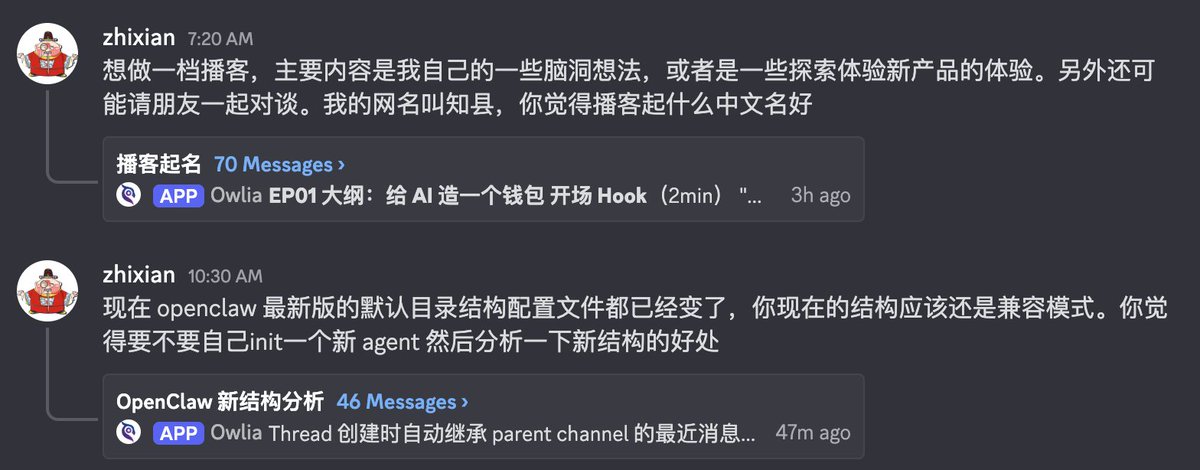
After introducing the Thread chat mode, we can explain the entire architecture clearly: each Channel in Discord Server is an independent Session, which is easy to understand; except for Channel, in fact, each Thread and Channel are actually the same, and are an independent Session. However, the latest version (2026.2.1) at the time of writing has updated a feature: Discord: inherit thread parent bindings for routing. Simply put, when Thread is created, the agent will automatically inherit the recent messages of the parent channel as the context, so that the agent can also know the “previous summary” in the thread. By making good use of the Thread function, the information organization in your Discord will be greatly improved, and the problem of session explosion will be less likely to occur.
My Discord workflow: Doomsday cabin in action
Next, I show you how I use Discord. My usage is to create a dedicated Server. Friends who have read my previous articles may know that I have an AI workflow Server called “Doomsday House”. Now I have opened a special Section here to host the entire process of my work with Owlia 🦉 (my OpenClaw agent).
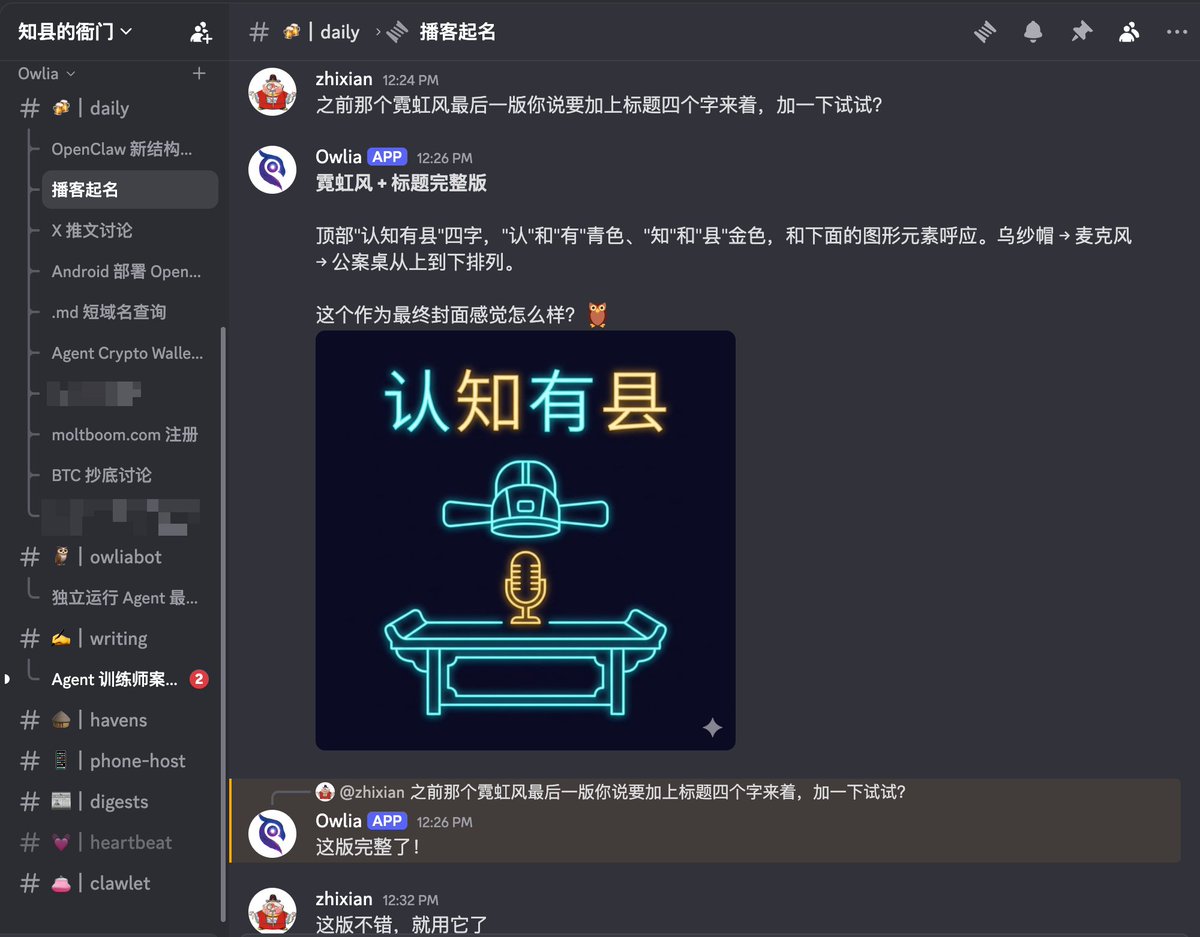
You can take a look at the screenshots. I basically divided them into categories:
One type is called “daily”, which is equivalent to chatting in the brainstorming stage. You can see a large list of Threads that are still in the open state below. The previous screenshot is the content form in this channel; the other type is content that has been independent and continues to be promoted as a project, such as owliabot and writing below; and the other type is daily push, such as digest and . .
In the daily chat channel, I will give the Agent an instruction: as long as I say something in it, your reply must first create a Thread (thread), and then continue in the Thread. This is still a soft constraint at the moment, but it works very well and can basically be followed.
The advantage of this is that things in the Daily channel are relatively complicated. When you suddenly think of something and want to continue the discussion – such as “I want to buy BTC at the bottom recently, what should I do?” – after sending this message, the Agent will analyze the current situation, ask your preferences and current positions, and then you can continue the chat.
When something becomes relatively large and you think it can become a long-term project, or even allow Agent to actively promote it, make it an independent Channel. You can tell the Agent in the new channel that this is a continuation of a previous Thread, and let it compress the original Session here, so that the conversation can be connected. The next step will be easier, because in this channel, you can still use Thread to conduct multi-dimensional discussions and folding.
The benefit of this way of working is that I can switch between different transactions very quickly. By default, OpenClaw can reply to messages in 4 different Sessions at the same time, and this quota can be changed, but 4 is enough for me. I rarely have 4 channels in the reply state at the same time (I still need to practice). At this time, you will find yourself like “Doctor Octopus”, waving four big claws to operate the work of four threads, and feel particularly accomplished.
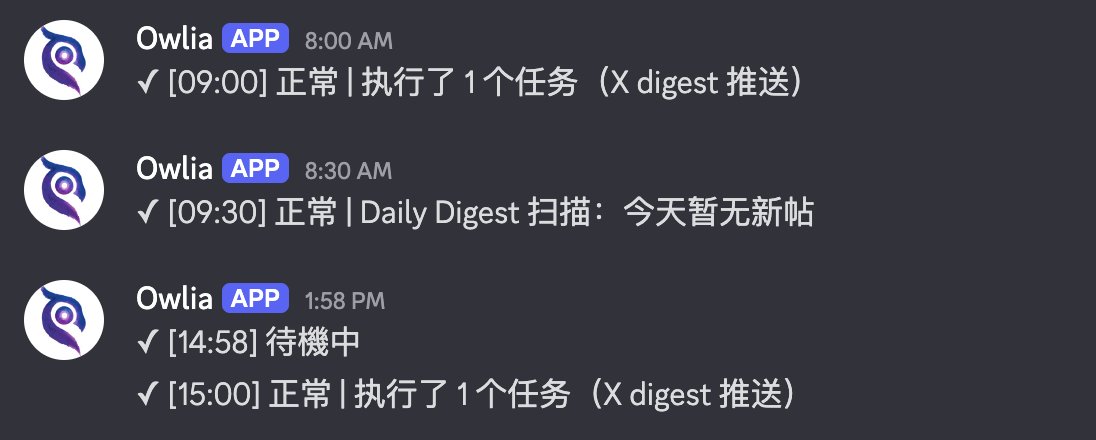
In addition to channels for advancing tasks, you can also create channels for some daily scheduled tasks. In this way, the previous work in the main session can be split into different directions. For example, I have a dedicated Channel called digest, which runs regularly several times a day to summarize and send the content on X and the blog. Another example is heartbeat. I need an observation window to understand the time and content of its triggering, so I built a heartbeat Channel to direct all output here. You can configure it based on the specific needs of your daily work and life.
Once configured, the capabilities of the entire “Doomsday Cabin” will become very powerful. Not only does it have automated processes, but it also houses a very powerful intelligent agent that can help you do things, look up information, and chat. These sessions are isolated from each other, and you can also specify a session to read the content of another session to quickly synchronize the context. This experience is well suited to the needs of advancing complex matters.
In theory, Slack can do it, but now I think I may not even use Slack in the future, because the experience of Discord is so good.
Discord advanced gameplay: Reaction, multi-Agent and model distribution
Discord also has some advanced ways to play:
Reaction. You can specify that different Reactions represent different functions, and let your Agent do the corresponding things according to your operations. For example, to collect: you can click a red heart♥️, and it will automatically forward the message to a certain channel for collection.
Agent. Each Channel or even Thread can be configured as a separate agent and can have its own various settings. In this way, if you need multiple agents to cooperate, you do not have to create multiple independent agent bots and bring in a bunch of robots. Instead, create a pm bot in #product and an engineer bot in #dev. You can even configure different models for them according to different task attributes. In this way, opus may be needed for product work to do in-depth design. In many cases, sonnet is already good enough for development work (of course complex logic may need to be matched) codex haha).
A similar attempt at Telegram (and why I gave up)
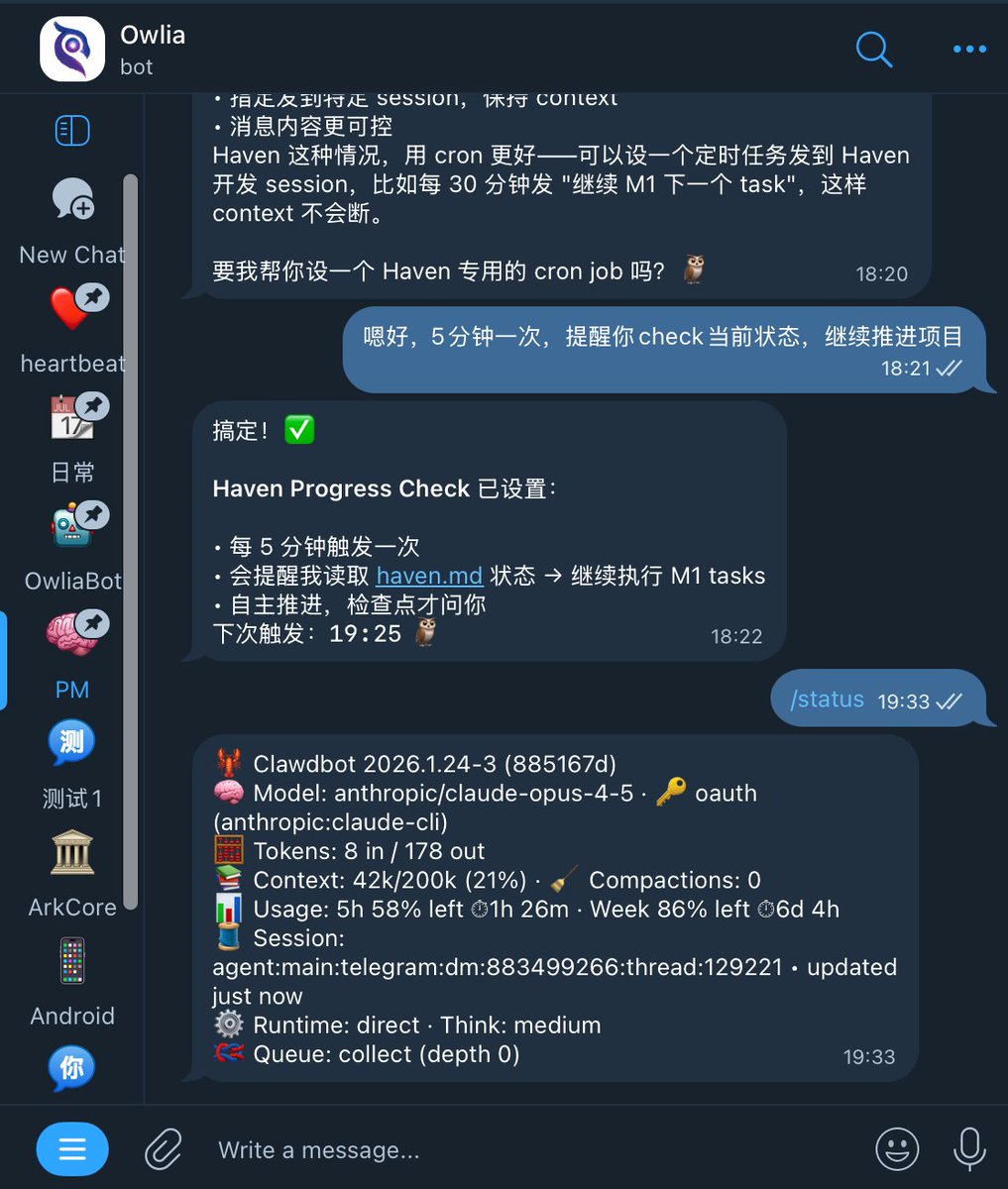
Finally, I will add some similar usages of Telegram. One is to open a Group and divide it into Topics. This is actually a function that Telegram has made under the pressure of Discord, but the experience has always been poor. In addition, Thread can also be turned on in the DM of Bot (actually the same mechanism as Topic), and the update on January 24 (then called Clawdbot) added support: when you set up Thread mode for Bot on BotFather (note that it must be in This switch can only be found in BotFather’s Mini App), and your DM with it will become like a Telegram Group with a Topic, except that the Topic is called Thread in the DM. My experience with it was very poor, so I won’t go into details here.
The era of natural language programming
Finally, I would like to express my thoughts. I used to implement the Reaction automation function in my “Doomsday House” by writing programs (of course also written by AI). With Agent, these things can be “compiled” into the process using natural language. This is also the biggest difference between the Agent era and the original era in my opinion: people have really realized programming in natural language, but the method is not to translate natural language into program code, but to have an Agent who can understand human speech and is proficient in programming or calling interfaces as the bridge.
This change in paradigm is similar to the change in AI paradigm back then. After all, no one expected that Transformer, the core architecture of modern large language models, would actually come from the path of machine translation.
So, Telegram or Discord?
Telegram is light and suitable for asking questions anytime and anywhere; Discord is heavy but has strong organizational skills and is suitable for long-term projects. So if you just want an AI assistant that you can chat with at any time, Telegram is enough. But if you want Agent to really help you with work, project promotion, and automation, Discord’s Server + Channel + Thread three-tier structure will make you feel like “finally you have a decent workbench.” My current usage is to open both sides, with Telegram as the mobile portal and Discord as the main battlefield.
OK, this article is here first. The next article may be about scheduled tasks and multi-agent collaboration, or see if there are any topics in the comment area that everyone wants to hear!
“Agent Trainer” series of articles:
- Agent Trainer Getting Started Guide: Clawdbot Configuration and Pitfalls
- Agent Trainer Safety Course: Clawdbot Seven-Step Self-Check Guide
- Agent trainer case sharing: Use Clawdbot to create exclusive writing workflow
- Agent Trainer Advanced Guide: Use Discord to create an efficient OpenClaw collaboration system
- Agent Trainer Advanced Course: OpenClaw Multi-Agent Configuration Practice
English versions are on zhixian.io
source
author:County magistrate|zhixian
Release time: February 3, 2026 15:59
source:Original post link
NovVista Editorial Comment
The single most underappreciated bottleneck in AI agent adoption is not model quality — it is workspace design. Every sophisticated user eventually discovers that a single chat window collapses under the weight of real work. You cannot run a content pipeline, debug an integration, track a research thread, and handle daily logistics in one scrolling context without the model losing the signal in the noise. Zhixian’s guide to AI agent trainer guide Discord automation is valuable precisely because it treats this spatial problem seriously and offers a concrete, reproducible solution rather than another prompt template.
The choice of Discord as the primary “operating system” for AI work is counterintuitive to anyone who associates the platform with gaming communities, but the logic is sound. Discord was built from the ground up to support hierarchical, concurrent communication across many threads and channels. That architecture translates directly into the kind of structured session management that complex AI workflows demand. The Server becomes the organisation, the Channels become the departments, and the Threads become the individual project rooms. When you frame it that way, the “Doomsday Cabin” stops looking eccentric and starts looking like good information architecture.
The session identity configuration —
session.dmScopeandsession.identityLinks— deserves more attention than it typically receives in beginner-facing guides. This is not a power-user edge case; it is a foundational privacy and usability concern for anyone who shares an agent instance with a partner, family member, or small team. The ability to maintain a unified personal memory across Telegram and Discord while simultaneously presenting an isolated, permission-limited interface to other users is the difference between a personal tool and a shared mess. Getting this right at the start prevents a category of frustrating session contamination that is almost impossible to diagnose after the fact.The natural language programming observation at the end of the guide is the most forward-looking part of the piece. When you instruct an agent to trigger a workflow based on a heart emoji, you are writing a conditional statement in plain English against a live API. The agent acts as the compilation layer. This is not a metaphor — it is a description of what is actually happening architecturally. The practical implication for our readers is significant: the skill being developed when you configure these Discord-based workflows is not “how to use OpenClaw.” It is how to think in conditional, state-aware terms without writing code. That skill transfers across every agentic platform, and it compounds in value as agents become more capable.
One area to watch carefully is the soft constraint approach to thread management. Instructing the agent to “always reply inside a thread” works well in the author’s experience, but it is ultimately dependent on model compliance rather than enforced by the platform. As workflow complexity grows, teams should consider whether to formalise this instruction in a channel-level system prompt rather than relying on conversational instruction alone. A structured prompt that specifies thread-first behaviour as a non-negotiable rule will prove more durable than a polite standing request, particularly as session context ages and the original instruction drifts toward the edge of the context window.